So from Kurt's post on the iPhone as a tool for field geologists, and the subsequent posts he linked to, I began thinking about applications that I would like to see on an iPhone (not that I own one or anything) to help make it a handy little field tool for hydrographers. There are some pretty sweet hydro-licious applications for the iPhone that already exist (check out TideApp and iNavX), and I am sure this is only the beginning. Here are a couple of proposed apps of my own:
1) Equipment/Serial Number App:
Something like this may exist. It would be handy to have a little app that could organize lists of equipment and their serial numbers. Each entry could link to a picture of the object stored within the iPhone. Clicking on each entry would then bring up the picture, manufacturer, contact info for service/repair, a link to the website, and perhaps even a link to the online manual (or a PDF stored on the phone).
2) Ship Light App:
I am not sure if the flashlight app has this feature already or not, but having the screen emit a red light for night-safe vision on the ship instead of a bright white light would be excellent.
3) Vessel Offset App:
An app that could be used to generate a little diagram of the ship complete with vessel offsets between the transducers, IMU, etc. Perhaps it could sort of be a fill-in-the-blank type of program, so you know right away if you are missing a crucial value. This happened during my field course, and while I am sure seasoned hydrographers have much less of a chance of making this mistake, and if you always survey on the same ship it is probably not as necessary, I still think this would be pretty helpful. With this app, you could always have a copy with you that could be used for reference or could be emailed to someone else.

Wednesday, June 24, 2009


Thursday, June 11, 2009
M&M Mars: Free Chocolate Relief Act!
Tired of everyone getting stimulus packages but you? Well, M&M Mars is helping out by giving away free full-size chocolate bars every Friday through September. All you have to do is sign up every Friday morning, and within a couple weeks you will get a coupon for a free candy bar in the mail.
Check it out: https://secure.realchocolate.com/
Monday, June 8, 2009
Fugro to buy Tenix LADS
Fugro, one of the world's leading survey companies both on- and offshore, looks like they are about to acquire the Australian-based Tenix LADS Cooporation. Tenix LADS is one of the global providers of airborbe lidar bathymetry, and has completed many contracts under NOAA and the US Navy. Another one of Fugro's subsidies, Fugro Pelagos Inc., also conducts surveys for NOAA utilizing an Optech SHOALS-1000T lidar system.
Here is the full blurb at Hydro International: http://www.hydro-international.com/news/id3216-Fugro_Acquires_Tenix_LADS.html
Here is the full blurb at Hydro International: http://www.hydro-international.com/news/id3216-Fugro_Acquires_Tenix_LADS.html
Thursday, June 4, 2009
Seafloor Images of Air France Crash Site Available
CCOM/JHC has been putting together seafloor images to help aid in the search for Air France Flight 447
http://www.unh.edu/news/cj_nr/2009/june/bp4seafloor.cfm

http://www.unh.edu/news/cj_nr/2009/june/bp4seafloor.cfm

The Exploration of Challenger Deep
Man, I cannot even imagine the excitement and anticipation the scientists on this project must feel!!
Point Loma scientists on team taking vehicle to the deepest place on Earth
Posted using ShareThis
Point Loma scientists on team taking vehicle to the deepest place on Earth
Posted using ShareThis
Friday, May 29, 2009
Easy Tables in TexShop on a Mac
Okay, so while Excel2Latex works great on my PC at school, it does not work so hot on my Mac running Excel 2004. TexShop was not happy with the output code at all. I tried some tips I found online, but no luck. Then I came across:
Cal2LaTex for OpenOffice and NeoOffice. This tool works like a charm and its menu options are superior to that of Excel2Latex. It did take me a few minutes to figure out how to assign the Macro its own listing under my Tools menubar, but other than that getting it working was a breeze.
And let's face it, on a Mac at least, NeoOffice seems to run better than MS Office anyway. Of course, since I discovered LaTex I generally only ever open Word when I have to open someone else's document. :)
Cal2LaTex for OpenOffice and NeoOffice. This tool works like a charm and its menu options are superior to that of Excel2Latex. It did take me a few minutes to figure out how to assign the Macro its own listing under my Tools menubar, but other than that getting it working was a breeze.
And let's face it, on a Mac at least, NeoOffice seems to run better than MS Office anyway. Of course, since I discovered LaTex I generally only ever open Word when I have to open someone else's document. :)
Tables in LaTex Made Easy!
Tables in Latex can be rather tricky, and I wanted to find some way of creating a table quickly that would look good. In Googling around, I stumbled across Excel2Latex. This little macros tool will add a toolbar button that will allow you to export directly from a table you have formatted in Excel (Mac or PC versions) into a piece of Latex code that can be pasted into you Tex document. Once in Tex, you can add some snazzy formatting (like lines, etc.) and you are all set. Excel2Latex will even convert all font formatting (bold, italic, etc.) for you.
Check out the results (I used /hline to add some lines to the original exported code):
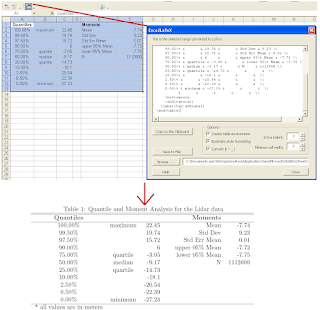
Note: I did have some troubles running the macros at first. I kept getting: "Error: Can't find project or library."
The Solution: Open your VBA editor in Excel (from Excel hit alt+F11) and then go to Tools -> References. Scroll down until you see the reference labeled MISSING and simply uncheck it.
The tool should now work.
Check out the results (I used /hline to add some lines to the original exported code):

Note: I did have some troubles running the macros at first. I kept getting: "Error: Can't find project or library."
The Solution: Open your VBA editor in Excel (from Excel hit alt+F11) and then go to Tools -> References. Scroll down until you see the reference labeled MISSING and simply uncheck it.
The tool should now work.
Subscribe to:
Posts (Atom)