Showing posts with label JabRef. Show all posts

Tuesday, January 4, 2011

Jabref export to HTML Table is awesome!

So I just discovered that Jabref, the free, open-source, cross-platform citation manager that I use has a very kick-ass feature thanks to Mark Schenk. Mark wrote a very nifty export tool for Jabref that exports selected entries to an interactive HTML table that is searchable and lets you view abstracts and the raw bibtex entry. Here is an example provided by Mark.

Here are the features as listed in the exported HTML source code:
  • optionally searches Abstracts and reviews
  • allows Regular Expression searches
  • e.g. to search for entries between 1980 and 1989, type: 198[0-9]
  • e.g. for any entry ending with 'symmetry', type: symmetry$
  • e.g. for all reftypes that are books: ^book$, or ^article$
  • e.g. for entries by either John or Doe, type john|doe

UPDATE: Browsing around Mark's page, I found that he has added even more features to this HTML table export, including the ability to sort columns by clicking on the header, and filtering list entries by entry type, year, author, etc. Here is an example from Mark.

Jabref comes with the first version of the export tool I described as well as a more simplified table (no abstracts or bibtex) already. To get more enhanced versions, visit Mark Schenk's Jabref tools webpage.

Monday, June 7, 2010

Another reason to use a version control system

I have posted about usefulness of Subversion version control system (svn) a couple of times already, but this morning has prompted me to do another one. Subversion allows you to backup all your valuable data, saving each commit as a separate version. You can see the differences between any two versions, checkout earlier versions, have multiple working copies, etc. If you are a coder, a version control system like svn is essential.

Anyway, this morning made me love svn even more. My main computer is being shipped off for repairs, and I am currently using the boyfriend's old Mac PowerBook G4. I needed to get it setup with all my files so I can continue to do my work. Instead of having to transfer files over one-at-a-time from one computer to the other, I simply did an svn "checkout" of what I needed.

A simple "svn co https:\\my repository path\trunk\Code" and "svn co https:\\my repository path\trunk\References" at the terminal prompt (from within the directory I want to download them to) and I am good to go. All my latest scripts, and my complete reference directory (all the pdfs of all the journal articles I use as references) are now on this computer, within seconds. If I make any changes to these files while on the boyfriend's computer I can simply "commit" them to my svn repository and when I get my computer back, do an "update" and I am all set!

JabRef has also proven to me, once again, its awesomeness this morning. I simply open up my main library.bib bibtex file (just checked out from svn) within JabRef, and there are all my journals, instantly organized and searchable. The PDF links work automatically, simply click on the icon, and the journal articles pops open before me in Acrobat Reader. To see why JabRef is such an awesome reference database software, check my initial blogpost on it here, and the follow-up (showing how, in conjunction with Zotero, it can make organizing and collecting references a breeze) here.

Wednesday, November 25, 2009

Accent marks in JabRef

I have a lot of PDFs with authors that have accent marks in their names, such as Ekström. I had thought that using the LaTeX code for the letter in my JabRef entries might work since the database is just a BibTex file. No such luck. Turns out you can just use the regular keyboard shortcuts for Mac/Win in JabRef to get the right letters. For a guide to the keyboard shortcuts, check out this about.com link.

JabRef might complain about not being able to encode certain characters when you go to save your database. If so, just chose UTF-8 for the character encoding option. UTF-8 will preserve any letters with accents, as well as foreign characters you might have (e.g. Greek letters in the abstracts).

Zotero AND JabRef: how to make both work for you

So yesterday I posted about how I switched over to JabRef reference software, mainly because it allows relative links, but also because it easily lets you see and edit the BibTex entry, which as a LaTeX user, is very helpful. There are two things JabRef does not really do that Zotero does that I find really useful:

1) Zotero can easily capture reference information from a variety of website formats, even if no Bibtex or RIS entry is provided

2) You can drop a pdf directly into Zotero, index it, and then retrieve the reference information automatically, assuming the article is online somewhere

If the article's webpage has a BibTex or RIS entry available for download, you can simply download this and import it into your JabRef database, but I have noticed some journals still do not offer this service (shame on them!)

So this morning I have been happily using Zotero to collect reference information I find online and to auto-generate some entries based off some PDFs I already had. Once I am done, I can export to a RIS file and then import that RIS file to my current JabRef database. My BibTex keys are automatically generated on import, so I simply select the new entries, go to Tools -> Scan Database -> Sync Files and any new PDFs I obtained during the day will be linked to their entry in JabRef.

I keep my Main.bib file that is my current JabRef database inside my folder with all my reference PDFs. At the end of the day, I can simply commit the whole folder to subversion. Everything is not only backed up, but when I checked out the folder on my Windows machine, all my PDF links will work perfectly and I won't have to tweak my database one bit!

I used to hesitate putting all my PDFs in svn, but our school server is pretty huge and the 1 GB or so of PDFs that I have now does not even make a dent. Plus, after hearing from a friend how he lost his whole PDF database and had to go download or even scan (yikes!) all his references again, I decided backing up all my articles in svn was not only OK, but necessary!

Tuesday, November 24, 2009

Zotero to JabRef: switching reference software

If you know the academic me, you know I love, and regularly tout, using Zotero to manage my ever-growing bibliography. There is one problem with Zotero, however, that I just cannot move past: its inability to use relative links for linking to files.

update: I edited the following paragraph to clear up some confusion pointed out in a posted comment. I should also point out that on Zotero's website, there are numerous posts from users requesting relative links, but with absolutely no reply from Zotero. This again makes me think that the way Zotero is written, relative links are not possible. Otherwise, they would have it, wouldn't they?

I love being able to sync my Zotero database between my personal Mac and school PC, but the syncing breaks the file links. If you sync your database to a second computer, it shows the links as still being there, but if you try to click on a file to open it within Zotero you get an error message saying Zotero cannot find it. You can tell Zotero where the file is, but you would have to do this for every file in the database. I am guessing this has something to do with Zotero running as a FireFox plug-in. When you add a PDF from another directory, Zotero copies it into its own internal structure, which is confusing and involves folders with random letter names. This is just not working for me. I want to be able to sync my database between my computers, and have functional links to the associated files.

I just switched today to JabRef and love it. It is free, works on Windows, Linux, and Mac, and let's you use relative links. It is simply a frontend for your BibTex file, but it has some really cool tricks:

1. It can autogenerate bibtex keys based on a format you specify
2. It can automatically link entries to files in any directory you specify based on the bibtex keys.
3. It is all stored in a small, easily transferable, BibTex file
4. It supports online searches so you can find and easily capture references online
5. It supports field-based views, but let's you view and directly edit the BibTex code as well as
4. I am sure there are a ton more, but I just started using it today

There are a couple tricks to switching over, so here is what I did:

1. Export the Zotero library in RIS format (my BibTex format export from Zotero caused issues with JabRef)

2. Import the RIS file into a new database in JabRef and save it

3. The internal PDF links from Zotero were written out to the URL field, meaning there are now a bunch of broken URL links in JabRef. To fix this, I navigated to the location of my new database file via terminal (or Cygwin in Windows) and did the following:

egrep -v "internal-pdf" original.bib > new.bib

This will delete all those pesky broken URLs that think they are internal PDF links, but still keep any legit URL links

4. Open the new.bib with JabRef (you can close out the old database now).

5. Under Options -> Preferences -> External Programs: Set the file and PDF directories to whatever directories you are already using (ex: /Users/mwolfson/Documents/School/Articles). Also check the "Autolink files with names starting with BibTex Key" option

6. Under the BibTex Key generator options, setup your BibTex key to match how you name your PDFs. My PDFs are named: author_year.pdf. So my BibTex Keys were set to [auth]_[year].

7. Select all your entries in your database, then go to Tools -> autogenerate BibTex Keys (let it overwrite old keys if necessary). Now all your entries should have the proper BibTex Key appended to them

8. While still selecting all records, Tools -> Scan Database -> Synchronize File Links (they have a specific PDF link, which works, but does not add the PDF icon to the entries for some reason -- perhaps because it uses a special pdf = {} in the bibtex code instead of file = {} -- so there is no way to know which entries have PDFs and which don't). Allow overwriting and hit OK. Now, if your PDF/file names in the specified directory match any of the BibTex keys, they will be auto-linked to the JabRef entry. Entries with linked PDFs should now show a PDF icon next to it.

update: There is an option under preferences to "show PDF/PS column" which would then, in fact, display the PDF icon if you choose to PDF sync rather than File sync. I have heard PDF/PS sync is being phased out since File sync handles these file types and more though, so I still recommend using File sync instead.

Viola! You should now have a working BibTex database in JabRef with all your articles linked. If you work across multiple computers like me, simply open up this database in JabRef on the new machine, set up your file directories to point to the appropriate files, and you are done. All your PDF links will work because the links themselves are relative! This is especially awesome when working cross-platform between Windows, Linux, and Mac.

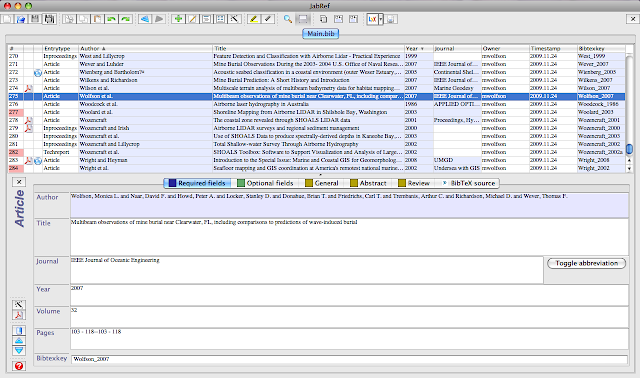
Here is a screen grab showing what JabRef looks like running on my Mac:

If you get stuck feel free to drop me a comment and I'll try to help.